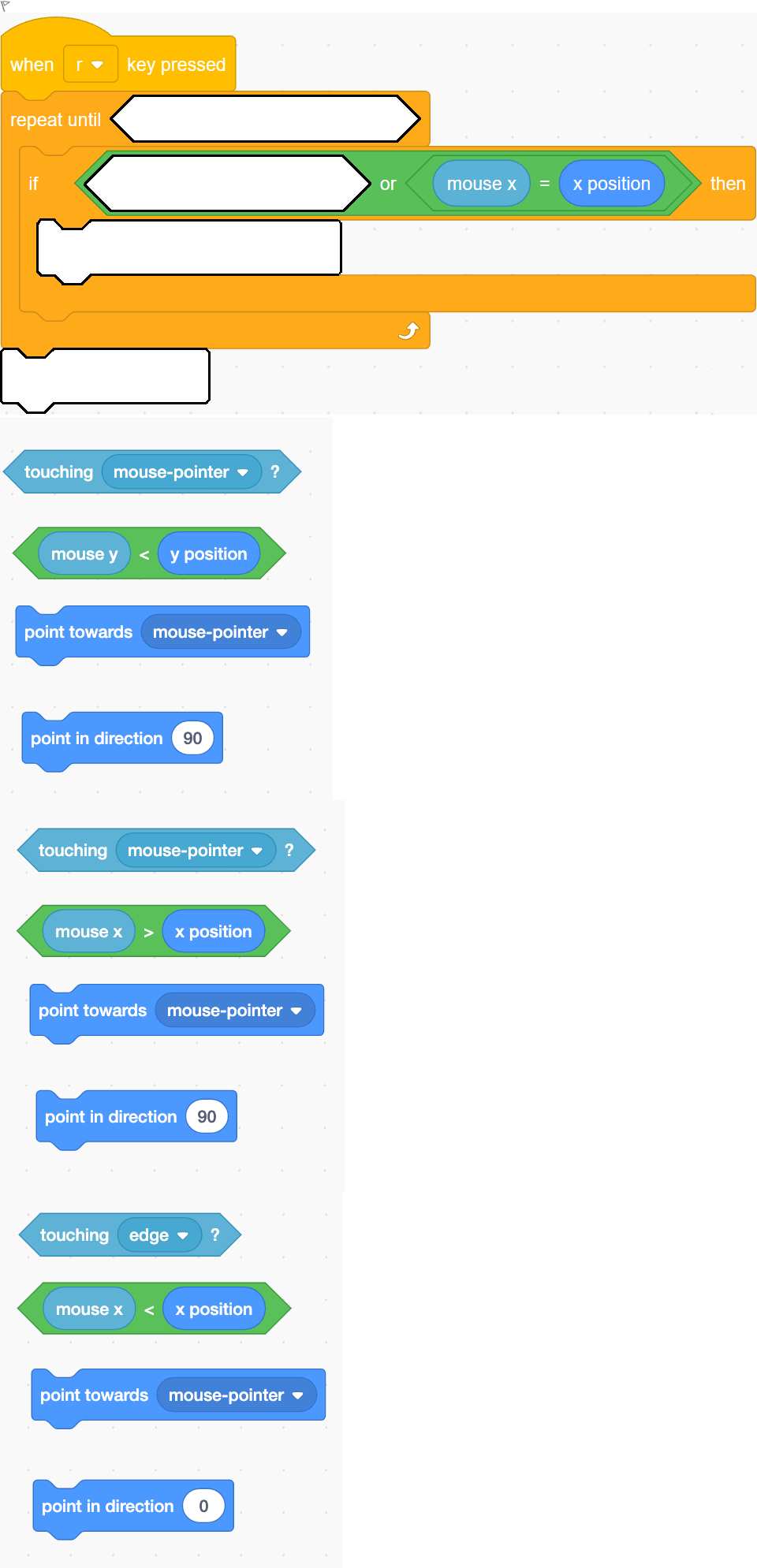
A scratch application consists of only one sprite, which is the Cat sprite. Whenever the user presses the r key, the Cat will rotate so that it is always pointing toward the mouse pointer.But when the mouse pointer is to the left of the Cat, the mouse will stop rotating. The Cat will not point to the mouse pointer when the mouse pointer is to the left of the Cat.The direction of the Cat will never be negative. The Cat will never face towards the left. Finally, when the mouse pointer touches the Cat, the Cat's direction is set to the default (i.e. facing to the right) and the Cat stops rotating. The Cat no longer always points in the direction of the mouse pointer. Watch the video below to see how the Cat behaves. https://lms.monashcollege.edu.au/pluginfile.php/4629749/question/questiontext/5681871/7/56775813/final%20vid%20version.mp4 Video Player is loading.Play VideoPlayMuteCurrent Time 0:00/Duration 1:05Loaded: 0.00%0:00Stream Type LIVESeek to live, currently behind liveLIVERemaining Time -1:05 1xPlayback Rate2x 1.75x 1.5x 1.25x 1x, selected 0.75x 0.5x ChaptersChapters Descriptionsdescriptions off, selected Captionscaptions settings, opens captions settings dialog captions off, selected Audio TrackPicture-in-PictureFullscreenThis is a modal window.Beginning of dialog window. Escape will cancel and close the window.TextColor[select: White, Black, Red, Green, Blue, Yellow, Magenta, Cyan]Transparency[select: Opaque, Semi-Transparent]BackgroundColor[select: Black, White, Red, Green, Blue, Yellow, Magenta, Cyan]Transparency[select: Opaque, Semi-Transparent, Transparent]WindowColor[select: Black, White, Red, Green, Blue, Yellow, Magenta, Cyan]Transparency[select: Transparent, Semi-Transparent, Opaque]Font Size[select: 50%, 75%, 100%, 125%, 150%, 175%, 200%, 300%, 400%]Text Edge Style[select: None, Raised, Depressed, Uniform, Dropshadow]Font Family[select: Proportional Sans-Serif, Monospace Sans-Serif, Proportional Serif, Monospace Serif, Casual, Script, Small Caps]Reset restore all settings to the default valuesDoneClose Modal DialogEnd of dialog window. The code shown below is the code for the Cat sprite. It is incomplete. Complete the code for the Cat sprite to produce the desired effect. 1. 2. 3. 4.Single choice
Log in for full answers
We've collected over 50,000 authentic original questions and detailed explanations from around the globe. Log in now and get instant access to the answers!
Similar Questions
Below is a script from a Scratch application.What type of shape will be drawn when the script is executed?
Looking at the block below, what will happen if a mark of 50 is entered?
Which statement is incorrect about Scratch?
A sprite application consists of just one sprite, which is the Cat sprite. When the user clicks on the Cat sprite, a balloon appears above the Cat and displays a nine digit number. The number displayed is shown below. The code shown below is the code for the Cat sprite. It is incomplete. Complete the code by selecting the appropriate values from choices given for the Cat sprite to produce the desired effect. 1. 2. 3. 4. 5.
More Practical Tools for Students Powered by AI Study Helper
Making Your Study Simpler
Join us and instantly unlock extensive past papers & exclusive solutions to get a head start on your studies!